Everything you need. Nothing you don't.
SelfBuildOS covers the whole self-build — schedule, money, materials, plans, paperwork, and your lender — without the client portals, proposals, and CRM bloat that pro tools make you pay for and wade through.
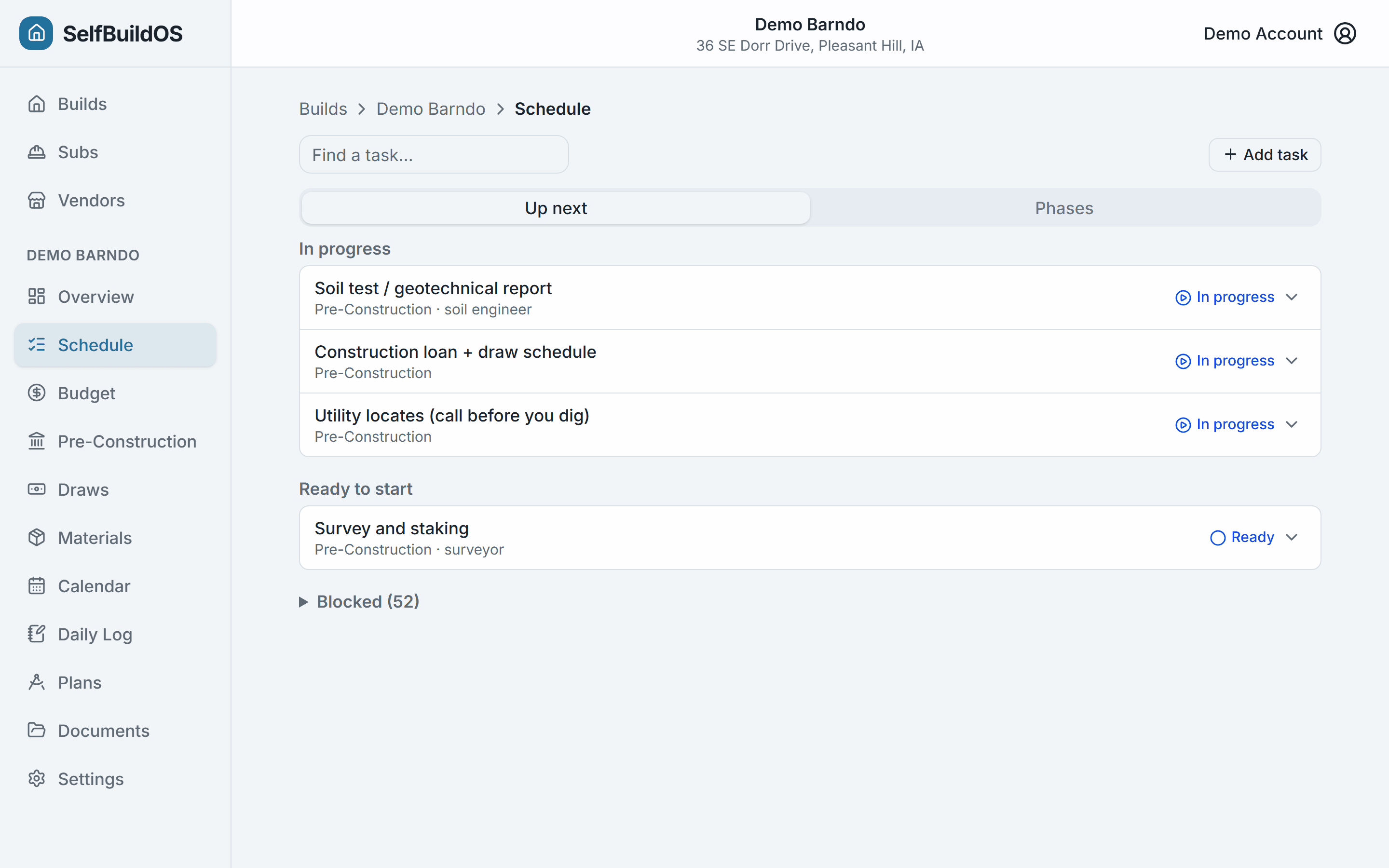
A schedule that already knows the sequence
The Post-Frame Standard template ships with the whole build wired up — tasks, durations, dependencies, and inspection gates. The Up Next view shows what you can start today and what's blocked, and the schedule reacts the moment you check work off — projecting finish dates forward as reality lands.
- 97 tasks across 7 phases with 163 dependencies, pre-built
- Inspection gates block downstream work — and a failed inspection gets correction notes, a reinspect-by date, and a one-tap reschedule
- Punch-list mode for the pre-final walkthrough — audit every room before the inspector does
- Long-lead warnings so windows and trusses get ordered early
- Every phase, task, dependency, and label is editable — fork-on-create keeps your copy yours
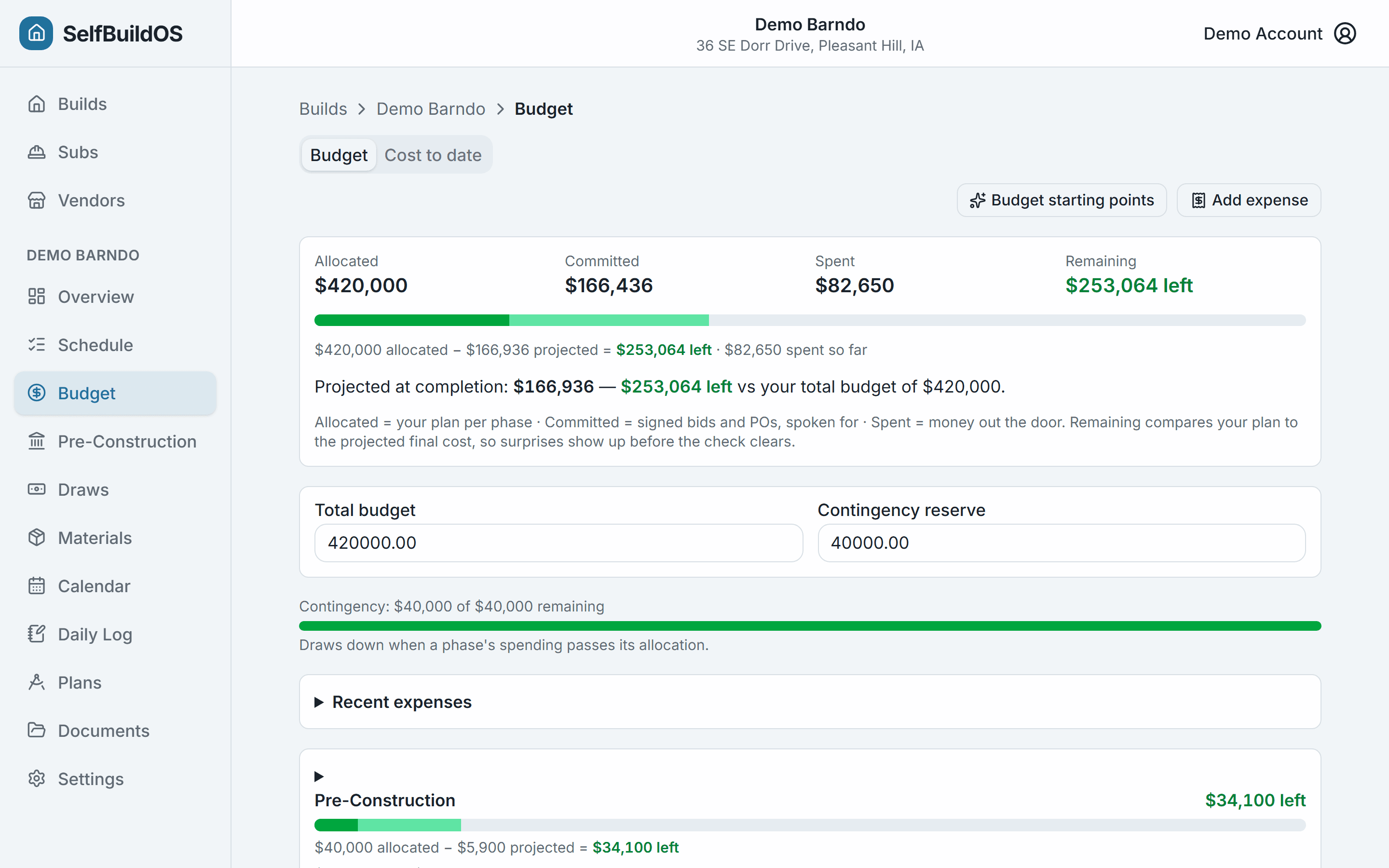
A budget that tracks labor, not just lumber
Three numbers per phase — Allocated, Committed, Actual — with subcontractor labor sitting right next to materials. The moment you commit past your allocation, you know, while you can still do something about it.
- Allocated / committed / actual rollups at the phase and build level
- Over-commitment warnings fire before the money is spent — at the phase and category level
- Bring your spreadsheet with you — import your existing budget from CSV, columns auto-detected
- Selection Management picks land here automatically — committed the moment you choose, tracked against each group's allowance
- One build-level contingency number — intact, or over, at a glance
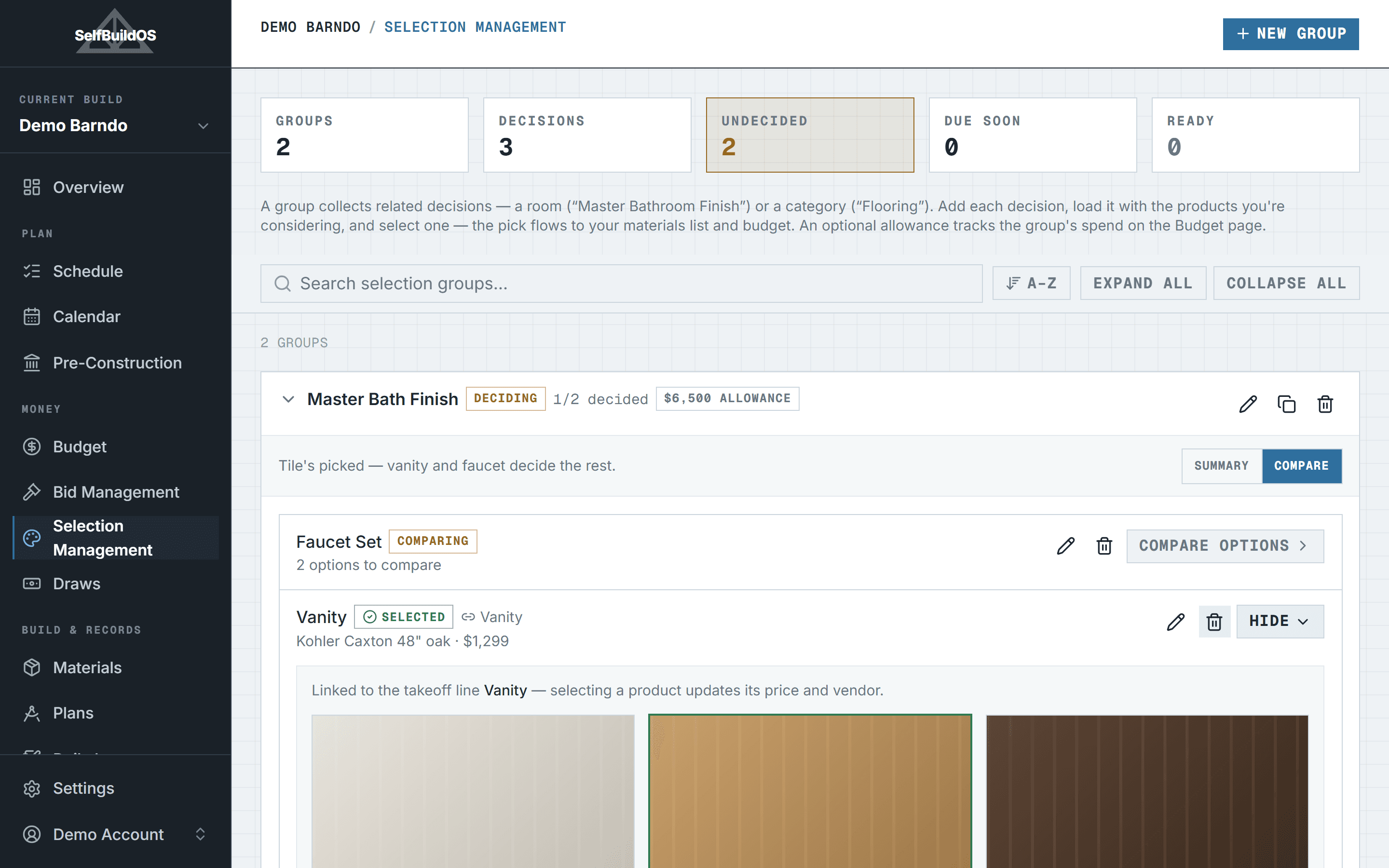
Selection Management: pick finishes with your eyes open
Every finish decision — the vanity, the flooring, the light over the island — gets its own side-by-side lineup: photos, prices, links, and where each one's from. Pick a winner and it lands in your takeoff and budget on the spot. The showroom notebook and the spreadsheet, finally the same thing.
- Group decisions by room or category — Master Bath Finish, Flooring, Lighting
- Every candidate is a card: a photo you snapped in the showroom or pasted from the product page, the vendor, the price, your notes
- Select one and the material line updates — or gets created — with its price and vendor, sales tax included
- Set an allowance per group and the budget page tracks committed and actual spend against it
- Once a line is ordered or purchased the pick locks — no accidental rewrites of money already in motion
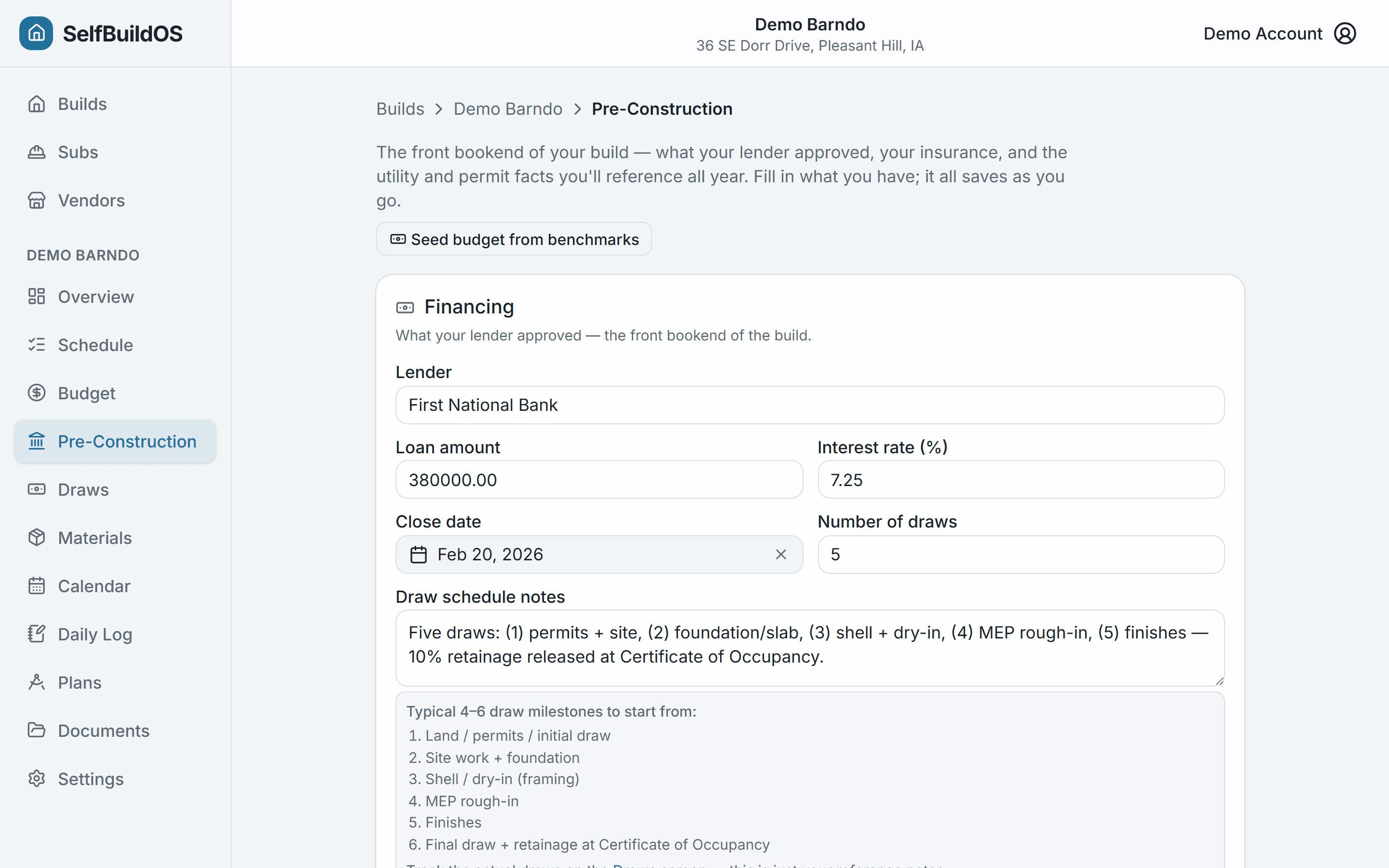
Set the money up right, before you break ground
The headline problem in owner-building is underestimating the budget. So this is a build-time feature: seed phase allocations from curated post-frame benchmarks, then capture the front-bookend facts — loan terms, draw schedule, builder's-risk, temp power, and permits — on a single pre-construction sheet.
- Benchmark-seeded allocations you can edit line by line
- Loan amount, rate, close date, and draw count in one place
- Builder's-risk carrier and policy expiry tracked
- Temp power and permit notes you'll reference all year
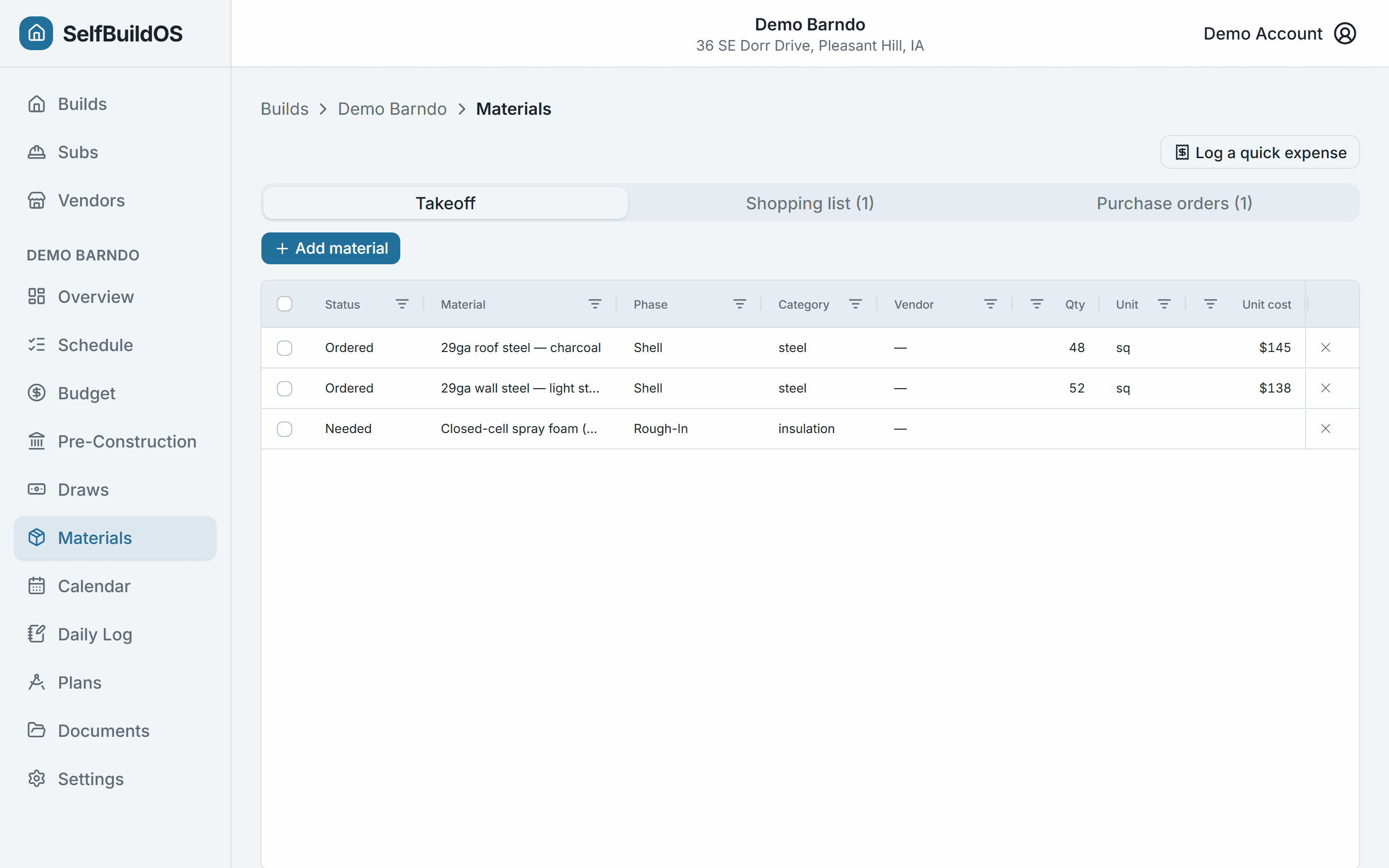
Materials ordered, tracked, delivered
A sortable takeoff grid you can edit inline, a vendor-grouped shopping list for purchase day, and purchase orders with delivery countdowns — so late steel surfaces before the crew is standing around waiting on it.
- Inline-editable takeoff grid with a purchase lifecycle (needed → ordered → purchased → received)
- Paste in your supplier quote or takeoff sheet — CSV import seeds the grid for you
- Shopping list grouped by vendor with click-to-call
- POs with expected-delivery countdowns and late flags
- Actual costs and receipts flow straight into the phase budget
Subs and inspections on one calendar
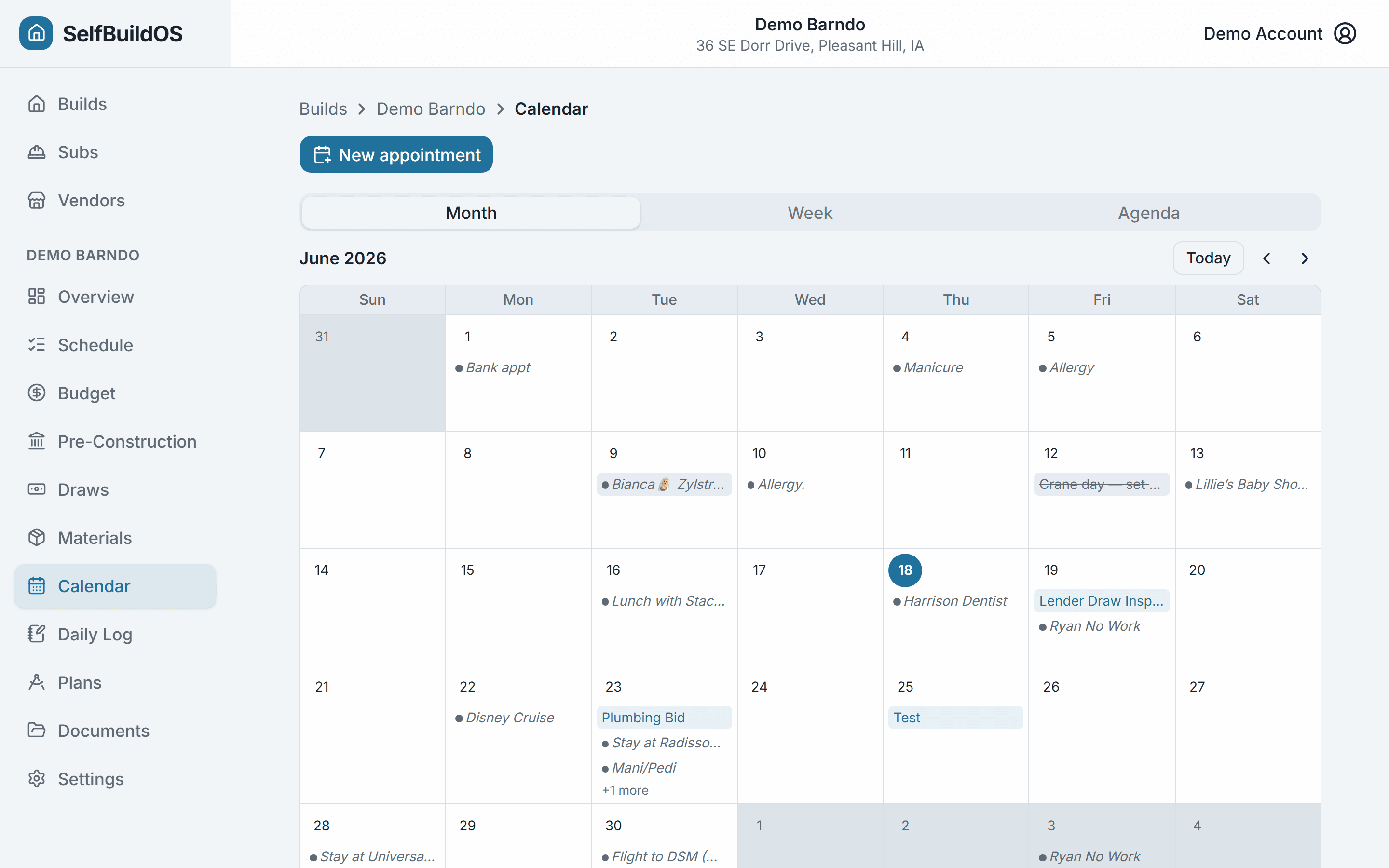
Your plumber shows up in Foundation, Rough-In, and Finish, so subs are real entities here — not rows in a phase. Schedule inspections from the gate itself, and connect Google Calendar so build appointments land on your phone next to the rest of your life.
- Trades directory with side-by-side bid comparison — accept a bid and the budget commitment is created for you
- A needs-a-bid radar flags phase-trade pairs coming up in the next 90 days with no accepted bid
- Calendar built around crane days, sub visits, and inspections
- Appointments push to Google Calendar — create, update, cancel — with your personal events overlaid read-only
- Booking a task whose inspection hasn't passed warns you up front
Your plans, marked up and on site
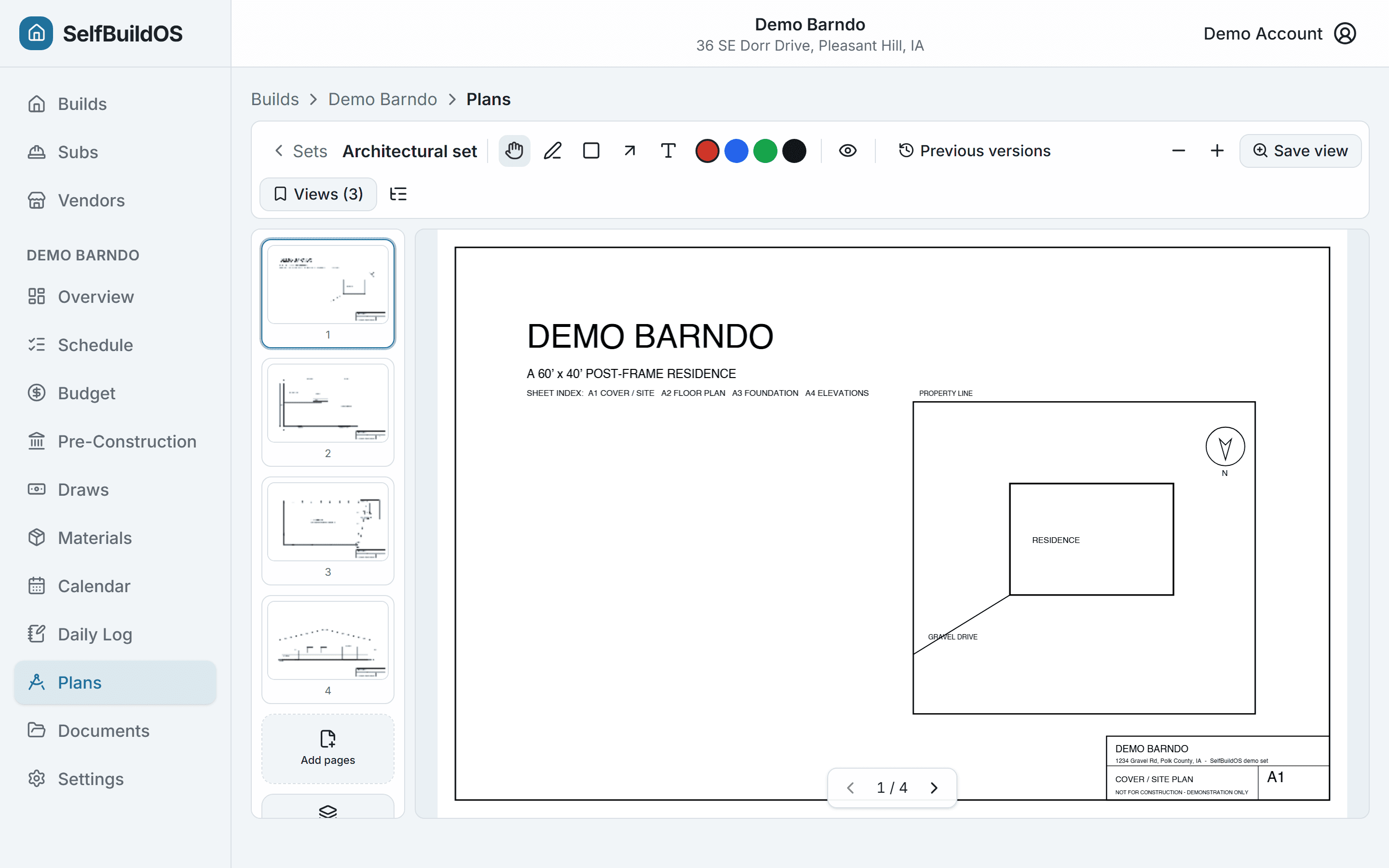
Upload the plan set and carry it everywhere: page through sheets, zoom into details, and drop pen, box, arrow, and text annotations that live in the app — the file is never touched. Save the views you keep returning to and link them to tasks. It's a viewer and a notebook — never a drawing editor.
- PDF and sharp images; vector PDFs zoom without pixelating
- Calibrate a sheet once and measure on-plan in real feet and inches
- Pin site photos to the exact spot on the sheet they were taken
- Slip-sheet a revision and your notes re-anchor to the new sheet
- Mark sheets available offline — cached on your phone for the dead-zone job site
Every document, filed where it belongs
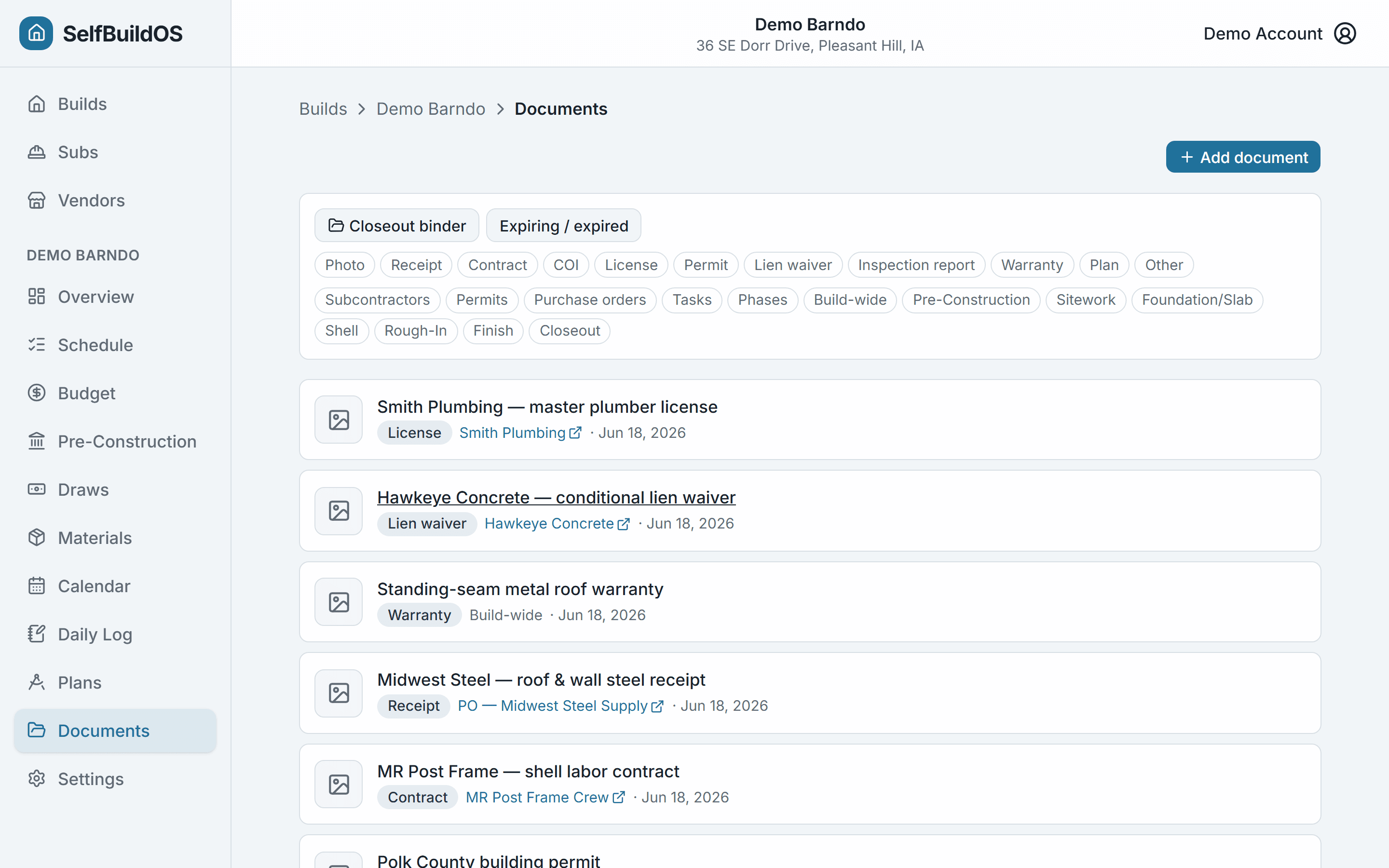
Contracts, COIs, permits, lien waivers, warranties, and receipts in one place — each filed against the task, sub, purchase order, payment, or bid it relates to. Set expiry dates and get reminded; pull the whole closeout binder in one click.
- Linked to the real thing — a task, a sub, a PO, a payment — not just a folder
- Expiry tracking on insurance, licenses, and permits
- One-click closeout binder filter and export
- PDFs and images render inline
A daily log that holds up later
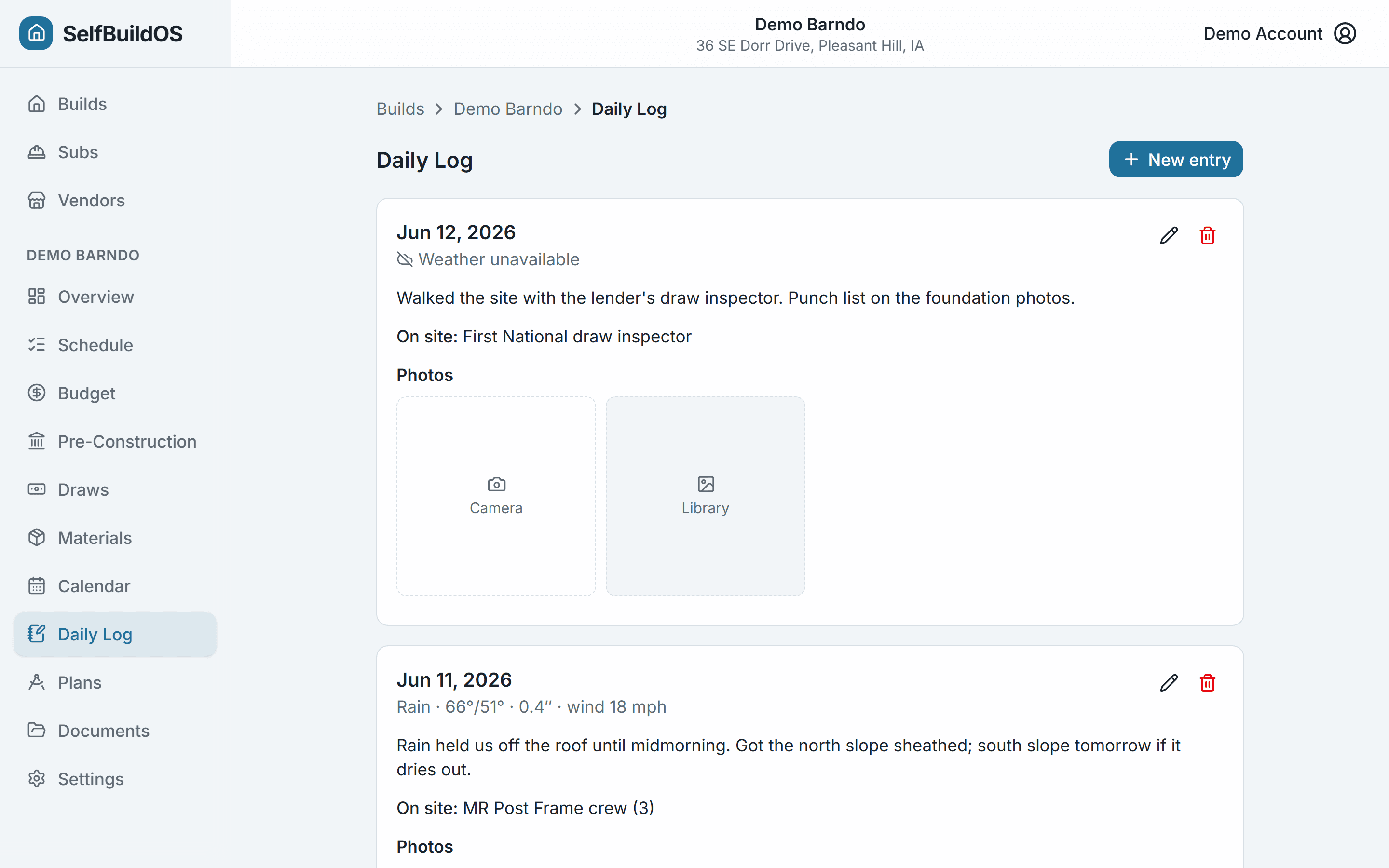
A flat, dated journal of the build: what happened, who was on site, and a few photos — with the weather captured automatically and frozen as a snapshot. It's the contemporaneous record that backs schedule slips, payment disputes, and loan draws.
- Automatic weather snapshot per entry (immutable)
- Who was on site, in free text — documentation, not timesheets
- Every photo from the whole build — tasks, POs, the day itself — auto-assembled into one Build Chronicle timeline
- A decision log with cost and schedule deltas — why the budget moved, on the record
- Reverse-chronological feed you can deep-link by date
Loan draws your lender can actually use
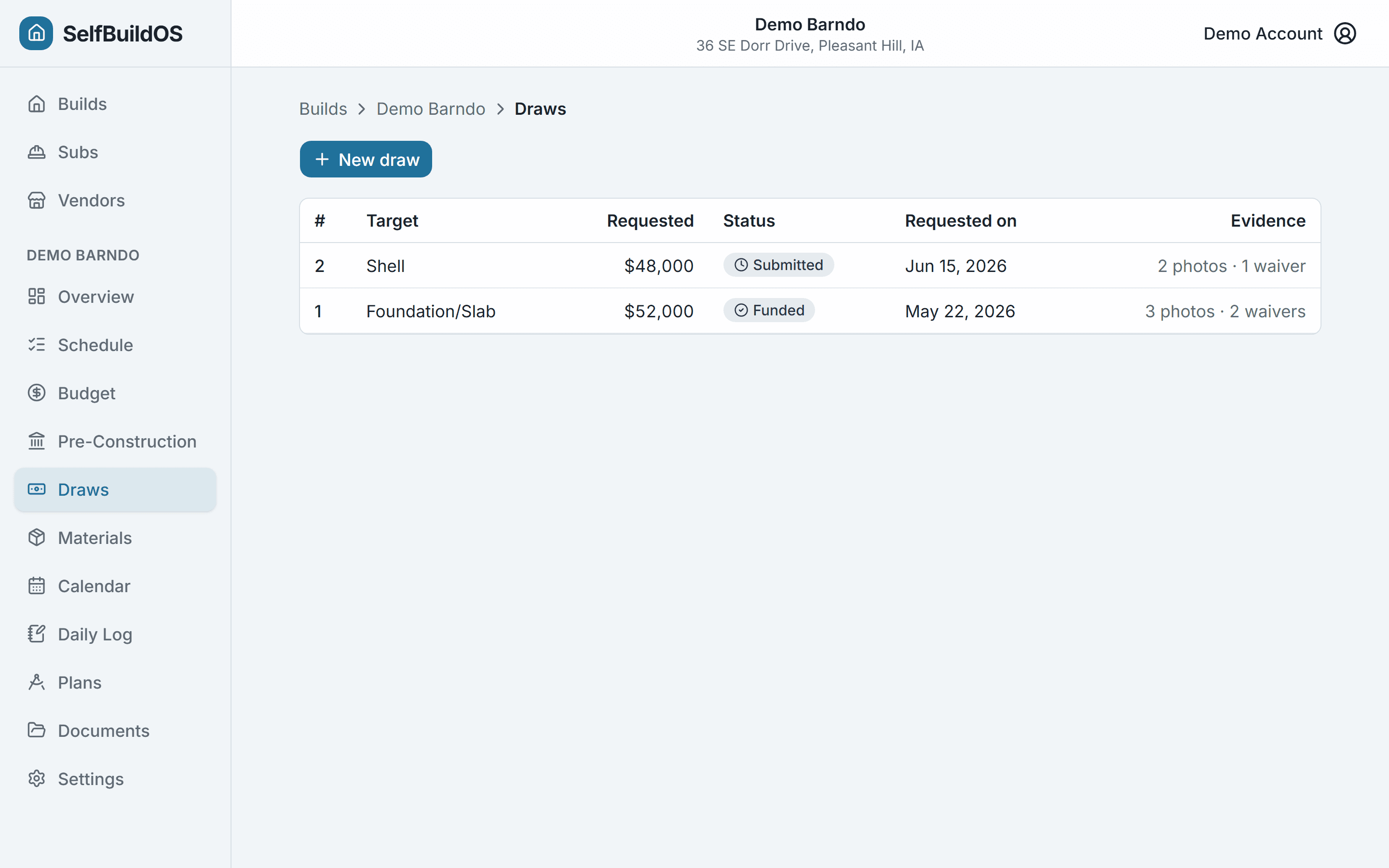
Construction loans release money in draws, and missing paperwork is the top reason they stall. Assemble a borrower-side Schedule of Values, tag the photos and lien waivers that prove the work, and export a clean per-draw package.
- Schedule of Values built from your real budget rollup
- Cost-to-date with committed, actual, projected, and variance
- Loan drawn vs. remaining, tracked as each draw funds
- Lien-waiver tracking on subcontractor payments
- Per-draw CSV export and print-to-PDF package
And it keeps you on track
Reminders that reach you
A reminder engine emails nudges for long-lead orders, expiring insurance and permits, upcoming inspections and appointments, and draws that are ready to request. Tune which ones you get, and the lead-time window, per your preference.
Trades & bids, without the phone tag
Collect competing bids per trade and compare them side by side, cheapest first — itemized lines, notes, and the sub's actual quote attached. Accept one and the budget commitment books itself; mark the rest lost.
Your data, always exportable
CSV, Excel, or print-ready PDF for six datasets — line items, purchase orders, budget summary, actual-spend ledger, documents index, and daily logs. Plus a single-file closeout binder PDF with your documents embedded, and a full-account ZIP archive. Nothing is locked in.
Built for the job site
Mobile-first and dark-mode ready, so checking off tasks, snapping photos, carrying plans, and logging the day work from the middle of the build. Mark plan sheets available offline and they're cached for the dead-zone job site — a dedicated offline app for the rest is on the roadmap.
All of this, for the price of one build
Every plan starts with a free trial. Your post-frame schedule is ready two minutes after you sign up.
Get startedCancel when you move in — that's the point.